
A customer asks for a quote on a custom product. Sales opens a pricing spreadsheet, engineering checks the specifications and someone else confirms material costs. Before the quote goes out, another team member reviews the numbers. The process works, but one quotation takes several people and multiple files.
For many manufacturers, spreadsheets are where quoting begins. They're familiar, flexible and easy to update, and when products and pricing rules are straightforward, they may be all a business needs. Problems begin when quoting involves more configurations, complicated pricing rules, repeated approvals and information that must move into production.
Manufacturing quoting software can help manage that complexity. But moving away from spreadsheets doesn't automatically mean buying a new platform or replacing your ERP. The first step is understanding where your current process works, where it creates problems and which type of solution makes sense for your business.
The short answer
Manufacturing quoting software helps a manufacturer configure products, apply pricing rules, route approvals and pass accepted quotes to production. A business may be ready to move beyond spreadsheets when pricing files conflict, configurations get complex, approvals stall, quotes are re-entered for production or changes are hard to track. Options include ERP features, estimating software, CPQ and custom software.

From many spreadsheets to one connected quoting workflow.
What is manufacturing quoting software?
Manufacturing quoting software helps businesses prepare, calculate, manage and approve customer quotations based on their products and production requirements. Unlike a basic sales quotation tool, it may need to account for material costs, labor, production methods, product configurations, pricing rules and engineering specifications.
Consider a manufacturer of custom industrial equipment. A customer may choose different dimensions, materials, components and accessories, and each selection can affect the price, the manufacturing requirements and the components needed for production. A quoting system can help manage these relationships so the sales team doesn't have to calculate every combination by hand.
Depending on the application, it may also support approvals, quote revisions, ERP integration and the transfer of product information into production workflows. The goal isn't simply a professional-looking quotation. It's a quoting process that is more consistent, manageable and connected to the rest of the business.
How do you know your quoting process has outgrown spreadsheets?
Spreadsheets aren't necessarily the problem. The warning signs appear when the process becomes difficult to control or maintain. Here are five situations worth reviewing.
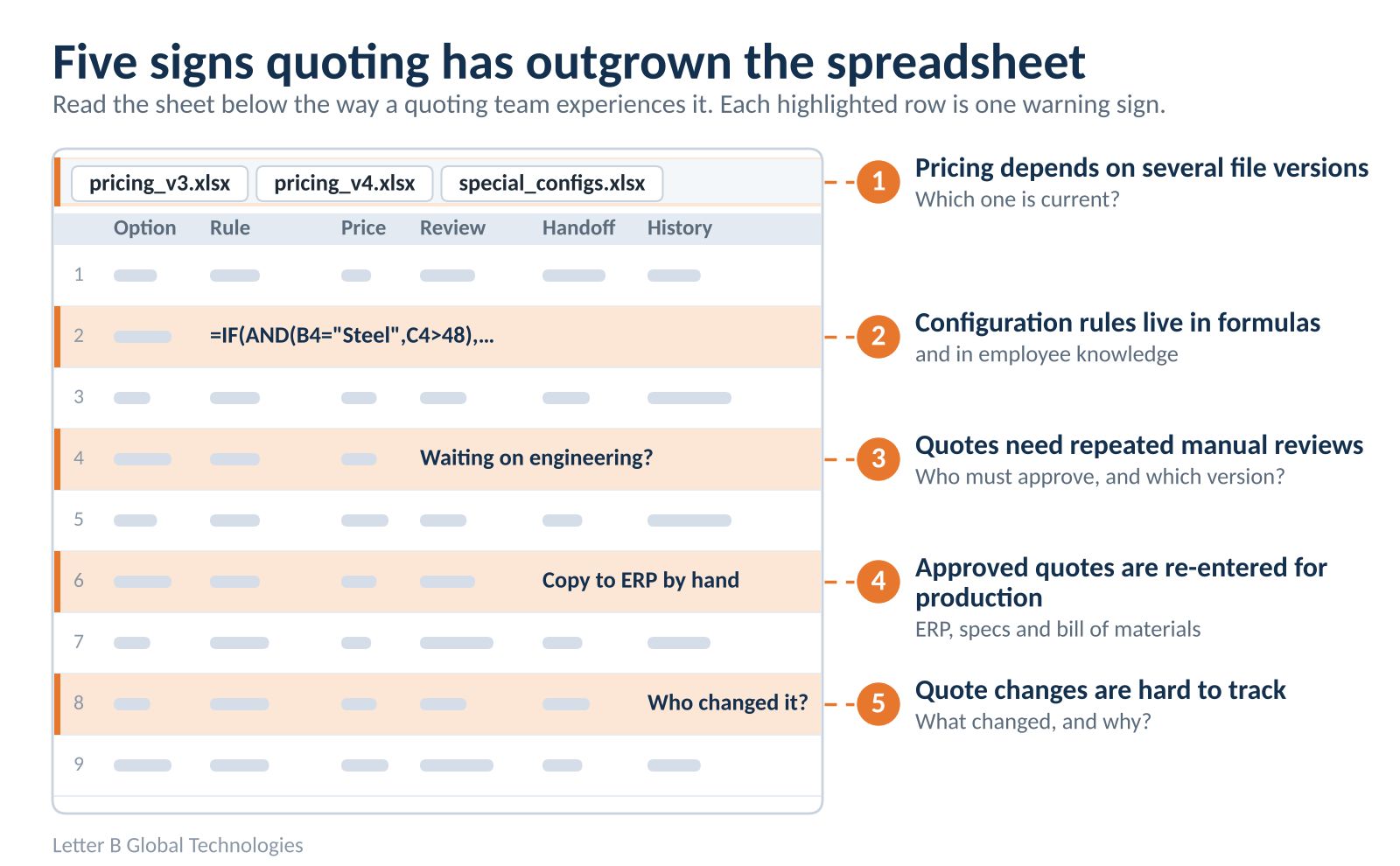
Each highlighted row in the sheet is one warning sign.
1. Does pricing depend on multiple spreadsheet versions?
One employee has the latest pricing file. Another uses a previous version. Someone else maintains a separate spreadsheet for special configurations. Even when the differences are small, the team spends time checking which information is correct, and as pricing rules change, maintaining several files gets harder. A centralized quoting process can establish a consistent source for calculations and approved pricing rules.
2. Are product configurations becoming more complex?
Custom manufacturing often involves more than selecting a product and entering a quantity. A quote may depend on material type, dimensions, equipment options, manufacturing methods or components that must work together, and some selections may affect which other options are available.
When these relationships live in spreadsheet formulas or employee knowledge, changing them becomes difficult. A more structured application can manage configuration rules and flag invalid combinations before a quotation is approved.
3. Do quotes require repeated manual reviews?
Sales prepares the quote, engineering checks the specifications and management reviews the pricing. Each handoff may involve emails, attachments and follow-up conversations.
The problem isn't that approvals are required, since those checks may be essential. The concern is whether the team can see what needs approval, who is responsible and which version has been approved. A defined approval workflow can make these steps easier to manage without removing necessary oversight.
4. Must approved quotes be re-entered for production?
A customer accepts a quote, but the work isn't finished. Employees may still need to transfer specifications into ERP, recreate product details, prepare a bill of materials or enter information for production planning. This adds work and creates opportunities for inconsistencies between what was quoted and what is prepared for manufacturing.
A connected quoting application may reduce those handoffs by passing approved information to downstream systems.
5. Is it hard to track quote changes?
Customers change requirements. Material costs change. Engineering recommends a different component. When quotes are managed across multiple files, it can be difficult to see what changed and why.
A structured quoting system can retain revision histories, approval records and the information associated with each version. That matters most when several people contribute to the final quotation.
The main question isn't whether your business uses spreadsheets. It's whether the quoting process stays accurate, repeatable and manageable as your requirements change.
What should manufacturing quoting software handle?
Not every manufacturer needs the same quoting capabilities. A business producing standard components may have relatively straightforward pricing requirements, while a manufacturer building configurable equipment may need more advanced controls. Before evaluating software, identify which capabilities matter to your operation.
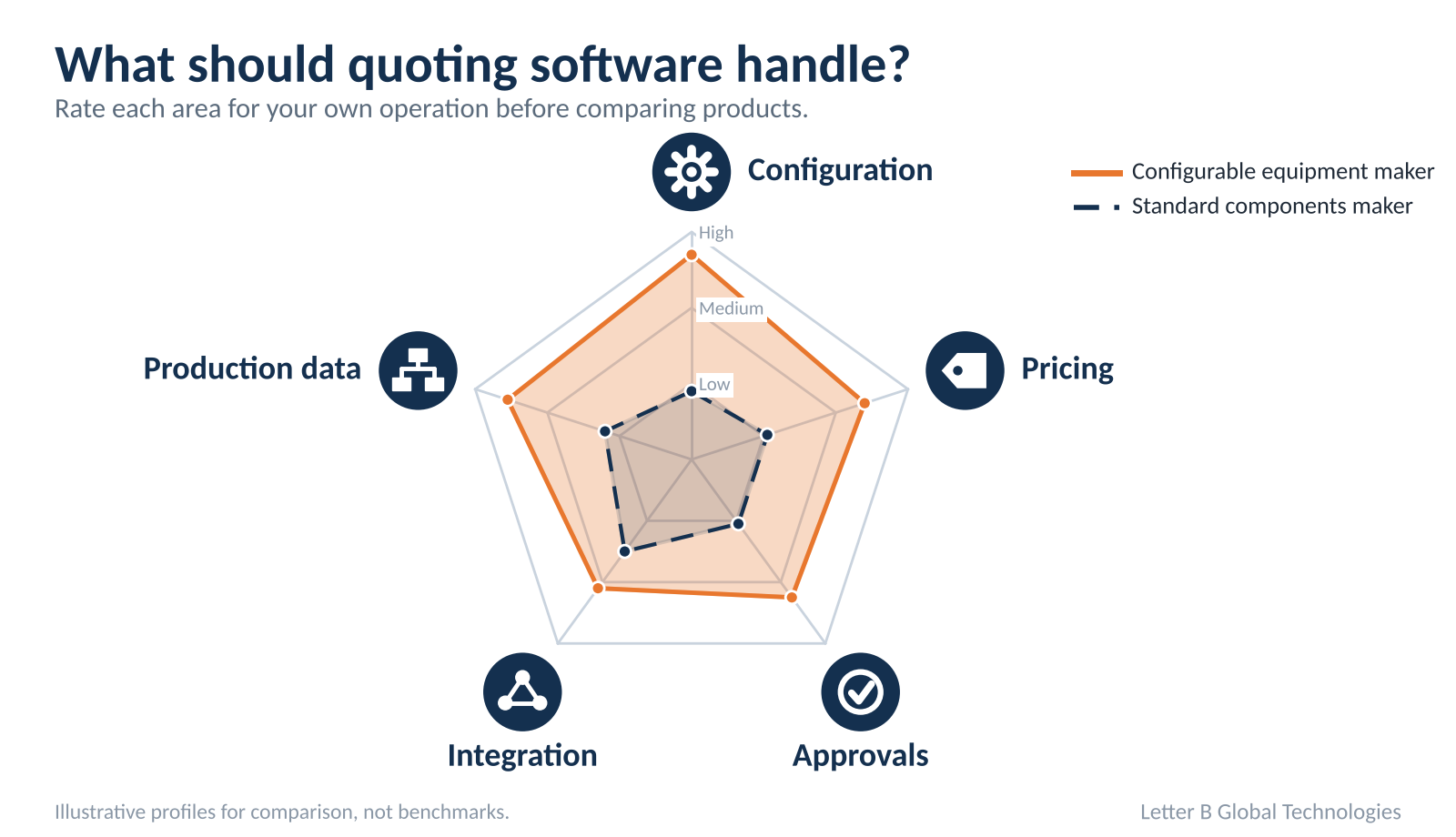
Needs differ by manufacturer, so rate each area for your own operation.
- Product configuration rules. Can the system handle different product options, combinations and restrictions? Does it help users avoid selecting configurations that cannot be manufactured?
- Cost and pricing calculations. Can it use the necessary material, labor and production cost information? How are margins, discounts and customer-specific pricing handled?
- Approvals and revisions. Can quotes be reviewed by the appropriate people? Does the system keep a record of changes and approved versions?
- Integration with existing applications. Does quoting need information from ERP, inventory, CRM or engineering systems? What should move between them?
- Production-ready information. After a quote is accepted, can the application supply the specifications, configurations or bill of materials that downstream processes need?
Not every quoting product includes all of these features, and the capabilities and integration options depend on the software selected. Start with the requirements your business actually needs instead of assuming that a longer feature list makes a product the better choice.
Manufacturing estimating vs. CPQ vs. ERP quoting: whats the difference?
Manufacturers evaluating quoting software will meet several categories of solutions. They can overlap, but each typically addresses a different part of the process.
| Software approach | Main purpose | When to consider it |
|---|---|---|
| Manufacturing estimating software | Calculate expected material, labor and production costs | When quotes depend heavily on job costing and production estimates |
| Manufacturing CPQ | Configure products, apply pricing rules and generate quotes | When products have many options, combinations or pricing conditions |
| ERP quoting functionality | Manage quotations within existing business processes | When the ERP already supports the required estimating and quoting workflow |
| Custom quoting software | Support specialized business rules, workflows and integrations | When important requirements cannot reasonably be met by existing or packaged solutions |
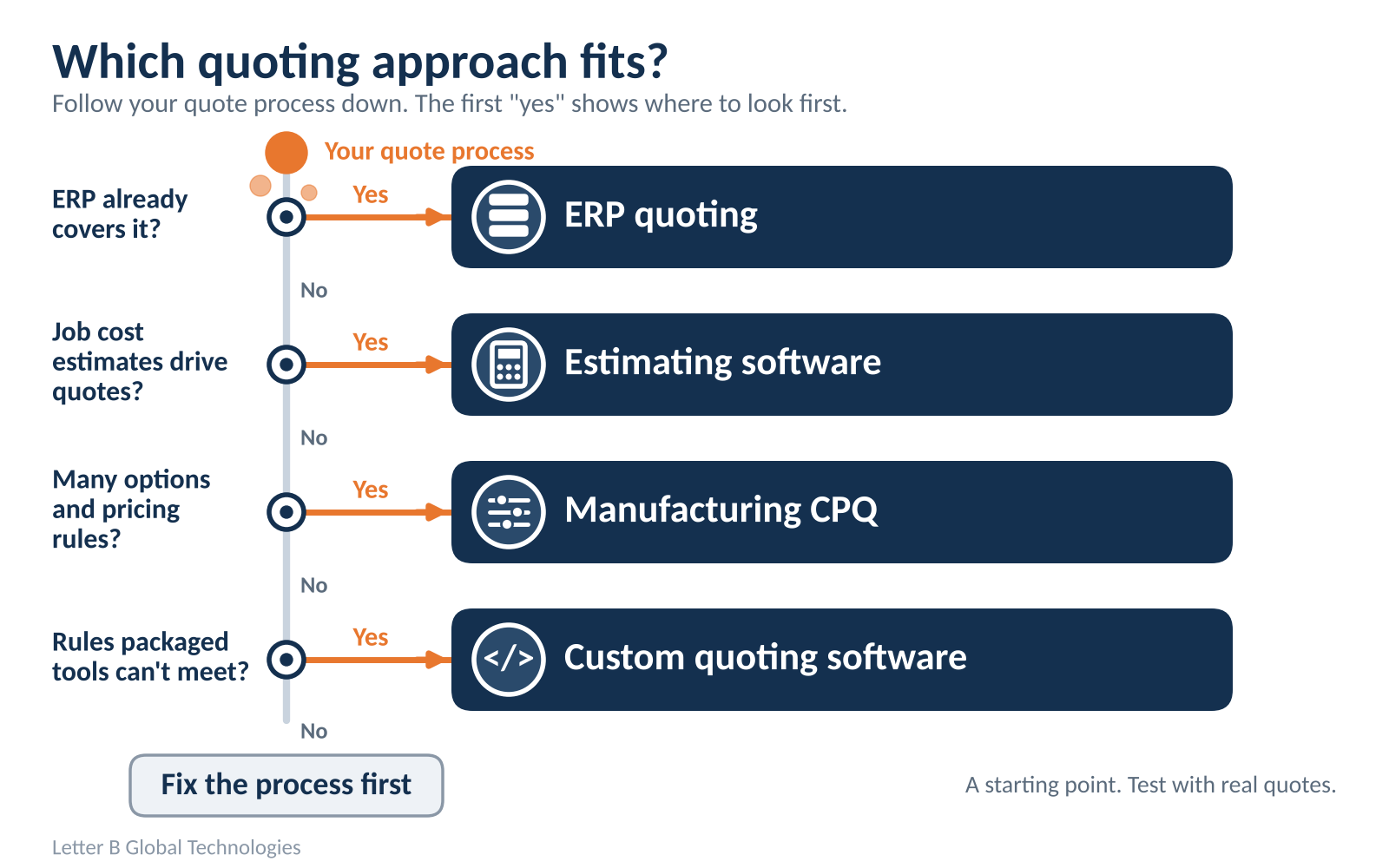
A starting point for choosing a quoting approach, not a rule.
What is manufacturing estimating software?
Estimating software focuses on determining what a job is likely to cost. For a machine shop, that could involve material quantities, labor, machining operations, setup time and other production expenses. The resulting estimate helps establish a suitable selling price, which makes this approach particularly relevant when each customer request needs a detailed cost calculation.
What is manufacturing CPQ software?
CPQ stands for configure, price, quote. Manufacturing CPQ helps users select valid product configurations, apply pricing rules and prepare quotations. An equipment manufacturer, for example, may offer multiple sizes, components, materials and accessories, and CPQ can guide the configuration process and calculate prices using established rules. Some systems can also generate or transfer configuration details for downstream manufacturing.
CPQ is generally positioned to work alongside ERP and CRM systems instead of replacing them, as SAP explains in its CPQ overview.
What is ERP quoting functionality?
Some ERP systems already offer sales quoting, estimating, pricing and order management. For manufacturers with relatively standard requirements, those features may be sufficient. Before you purchase another application, review what your ERP currently supports and whether additional configuration or integration could solve the problem.
The right choice depends on your workflow. A job shop estimating one-off parts may have different requirements from a manufacturer selling configurable equipment.
Should you buy off-the-shelf or custom manufacturing quoting software?
Once requirements are clear, manufacturers must decide whether to use an existing product or build something tailored to their business. Both approaches can work.
When is off-the-shelf software enough?
Packaged quoting software may be appropriate when your processes align with the capabilities of an established product. It can be a good option when:
- Product configurations and pricing rules are supported by the software.
- Required ERP or CRM connections are available.
- Approval workflows can be configured without extensive changes.
- The vendor provides the maintenance and support your business needs.
- Licensing and implementation costs fit the available budget.
The advantage is that the company adopts an existing application rather than developing and maintaining one from the start. However, test whether the product handles your real quoting scenarios, not just the examples shown in a demonstration.
When does custom quoting software make sense?
Some manufacturers have quoting requirements shaped by years of specialized production processes. Their products may involve unusual configuration rules, proprietary calculations, multiple engineering reviews or connections with older business applications. In these situations, packaged tools may need extensive customization or leave important parts of the process outside the system. A custom application may be worth considering when:
- Product configuration logic is unique to the business.
- Employees must use several disconnected tools to complete one quotation.
- Specialized pricing and approval rules are difficult to support.
- Existing software cannot pass the necessary information to downstream systems.
- The company needs greater control over how the workflow evolves.
Custom software also brings responsibilities. Development, testing, maintenance, security and future improvements must be planned and funded.
The best option is the one that meets your business requirements at an acceptable level of cost, complexity and long-term support.
A custom application shouldn't be the default recommendation. It should solve a business problem that existing solutions cannot address appropriately. Letter B also works with managed service providers to build custom quoting systems tailored to each manufacturer's workflow.
Why does the quote-to-production handoff matter?
A quotation is only one step in a larger manufacturing process. After a customer approves a quote, the business may need to create an order, confirm specifications, prepare materials, schedule work and communicate requirements to production. For manufacturers offering configurable products, that information must stay consistent throughout.
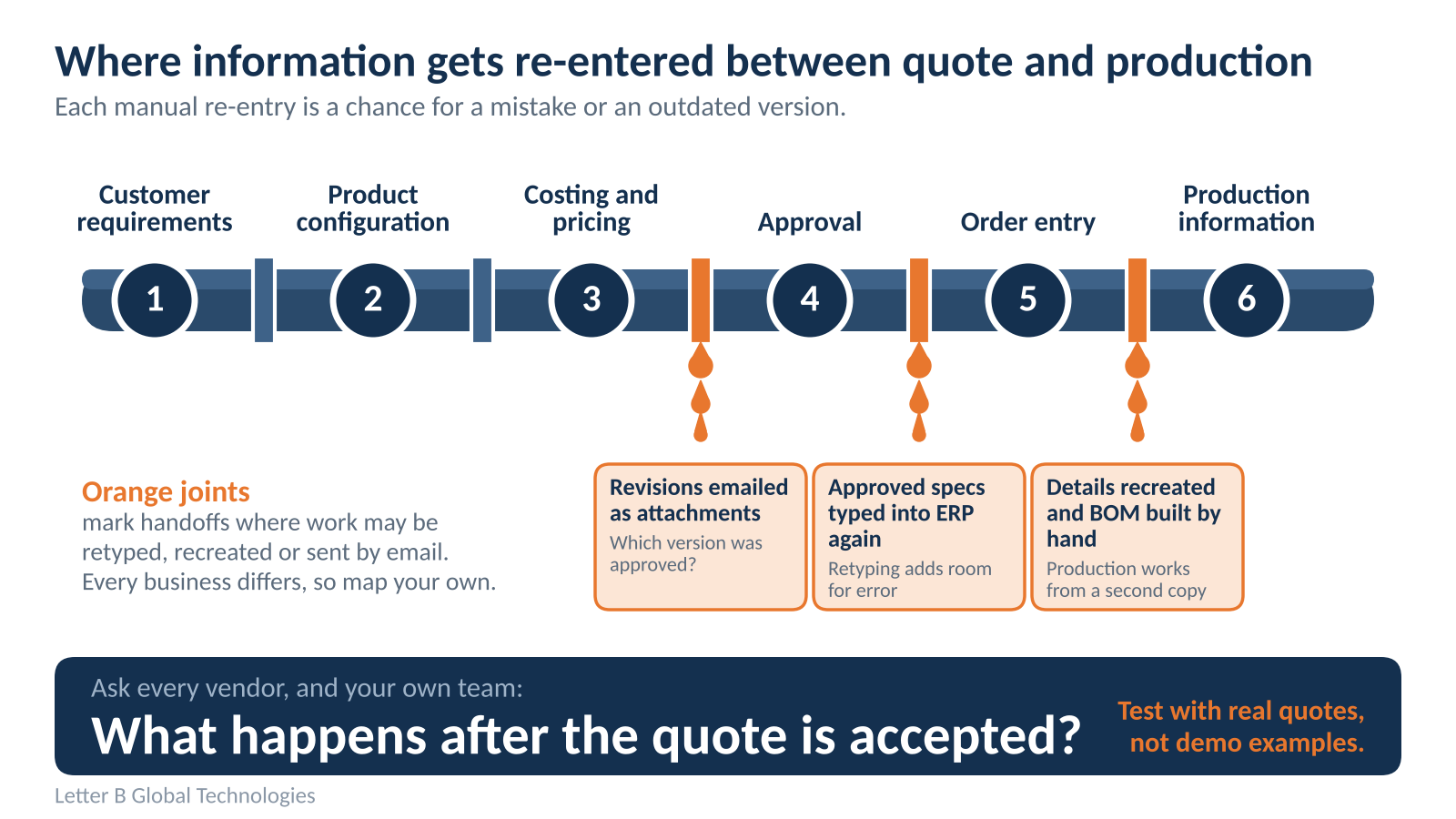
Ask what happens after the quote is accepted.
Consider the workflow: customer requirements → product configuration → costing and pricing → approval → order entry → production information. At each stage, information may pass between different people and systems. If the approved configuration must be entered again, employees have another chance to make a mistake or work from an outdated version.
A better-connected quoting workflow can help reduce that repeated work. For example, an approved product configuration may be used to generate or populate a bill of materials, depending on the application and integration design. That doesn't mean quoting software should control every production decision, since engineering validation, inventory checks and production approvals may still be necessary. The important question is whether information can move accurately between the systems involved.
When you evaluate manufacturing quoting software, ask what happens after the quote is accepted, not just how quickly a quotation can be created. Our guide to replacing legacy systems in manufacturing covers the related problem of manual data entry after approval.
What does replacing 15 quoting spreadsheets with one application look like?
A project Letter B Global Technologies completed for a national manufacturer of waste containers shows how specialized quoting requirements can outgrow spreadsheets. The company managed quoting across 15 spreadsheets, and each container could be configured with more than 100 options. Custom product requests went through manual reviews and email approval chains, and the problems included pricing uncertainty, version control lapses and keying errors.
Rather than simply reproducing the spreadsheets in another format, Letter B started by mapping the existing quoting model. It then built a custom cloud application and digitized the workflows and approvals. The application brought product configuration, pricing and discount controls, quote approvals, lifecycle tracking, remote sales collaboration and role-based access into one connected workflow, and it generates a bill of materials from each quoted configuration.
According to the case study, the results include faster quoting, standardized quote variables and fewer revisions. The project shows that manufacturing quoting software isn't always about replacing a standard quotation form. Sometimes the challenge is organizing business-specific rules into an application that employees can manage consistently. You can explore more examples in Letter B's custom software case studies.
What should manufacturers review before choosing quoting software?
Before requesting software demonstrations or starting a development project, review how quoting currently works. A short assessment can reveal whether the main problem involves calculations, product configurations, approvals, integration or something else. Start with these questions:
- How is a quote created today? Identify every spreadsheet, application and department involved.
- Where do delays or errors occur? Review repeated calculations, manual approvals, version confusion and data re-entry.
- How complex are the product and pricing rules? Document configuration requirements, exceptions, discounts and engineering dependencies.
- What happens after a quote is approved? Identify the information required by ERP, purchasing, inventory, engineering and production.
- What can existing systems already handle? Check whether your current ERP or other business applications offer capabilities that have not been fully used.
- What will the solution cost to operate? Consider licensing or development, integrations, employee training, support and future changes.
Testing several real quotes is especially useful. Choose a straightforward order, a complex product configuration and a quotation that previously required several revisions, then check whether a proposed system can support the work without introducing new complications. The goal is to understand your requirements before committing to a platform.
What is a practical next step for your quoting process?
Spreadsheets can be useful tools for manufacturing quotations, particularly when products and pricing requirements are straightforward. As configurations become more complicated and more people depend on the same information, however, the process may need a more structured approach. The right solution could be an existing ERP feature, a manufacturing estimating platform, CPQ software or a custom application.
Letter B Global Technologies helps manufacturers evaluate and improve specialized business workflows through custom software development, integration and modernization. If your quoting process depends on multiple spreadsheets, complex calculations or repeated handoffs between departments, it may be worth reviewing how those steps work together. See Letter B's manufacturing software work for more.
Enjoyed this insight?
Explore how Letter B turns the same challenge into an operational win.
Common questions about manufacturing
Consider a more structured solution when spreadsheets are hard to maintain, pricing rules are inconsistent, approvals are hard to track, or quote information must be entered again in other systems. It does not always mean replacing every spreadsheet. Improving one critical part of the process first can be the practical start.
Related insights
View all
Digital Transformation in Manufacturing: How to Prioritize Technology Investments for 2027
Digital transformation in manufacturing needs a plan. Learn how to score technology projects, decide what comes first and build a 1–5 year r...
Read article
How Manufacturers Can Modernize Legacy Software Without Disrupting Production
How manufacturers can modernize legacy software without stopping production: five warning signs, a six-step process and a 2027 budget roadma...
Read article
Why Your Manufacturing Systems Don't Work Together and What to Fix First
See why manufacturing systems become disconnected, how ERP and shop floor data gaps affect operations, and what to fix first before investin...
Read article