
A production manager checks the morning schedule. Five work orders should be moving through the plant, but by midday one is behind schedule, another is waiting for materials and a third is almost complete. The ERP system still shows yesterday's updates. To find out what's happening, the manager calls a supervisor, checks a spreadsheet and walks across the shop floor.
It's a familiar problem for manufacturers that rely on manual reporting or disconnected production systems. But improving production visibility doesn't always mean replacing ERP or implementing a full manufacturing execution system (MES). The right starting point is finding out what information is missing, how it's collected today and what your existing software can already support.
The short answer
Production tracking software records work-order progress, quantities, downtime and delays as work moves through the plant, so managers can see current status without calling supervisors. It may be part of an ERP, an MES or a standalone tool. Many manufacturers can improve visibility by configuring their ERP, adding a focused app or connecting systems they already own.

What the floor knows at midday and what the ERP still shows. Illustrative example.
What is production tracking software?
Production tracking software is a manufacturing application used to record, monitor and report production activity as work moves through different stages. It helps answer practical questions:
- Which work orders are running right now?
- How many units have been completed?
- Which orders are behind schedule, and why has production stopped or slowed?
- What is waiting for materials, inspection or the next operation?
Take a metal fabrication company that moves an order through cutting, bending, welding, finishing and inspection. Without a consistent tracking process, a production manager may have to contact each department to learn where the order is. With tracking software, employees record the completion of each stage and authorized teams see the update in a shared system. Depending on the solution, the information can come from operator input, barcode or RFID scanning, machine connections or existing ERP transactions. The purpose isn't to generate more reports. It's to make production information accurate, accessible and useful for daily operations.
Why is shop floor visibility so hard for manufacturers?
Shop floor visibility is the ability to see the current status of manufacturing activity, including work-order progress, output, delays and exceptions. Manufacturers struggle with it because information is recorded in different places or arrives too late to support decisions. A supervisor writes completed quantities on paper, operators log downtime in a spreadsheet and inventory transactions are entered into ERP at the end of the shift. Each record is useful, but nobody can see the whole picture during the day. That creates four common problems:
- Delayed updates. Work orders look active even when production is waiting for materials or equipment.
- Manual information gathering. Managers spend time calling supervisors and reconciling reports instead of fixing problems.
- Inconsistent records. ERP, spreadsheets and departmental reports show different quantities or statuses.
- Delays with no explanation. A manager knows an order is late but can't quickly tell why.
None of this automatically means the ERP is inadequate. Sometimes the issue is how employees capture production information, and sometimes the applications need a better connection to each other.
How do you find where production information goes stale?
Before choosing software, trace one work order through a single day. For each event, write down who knew first, where it was recorded and when a decision-maker could see it. The gap between the first and last answer shows where visibility breaks, and it tells you whether you need a better process, an integration or new software. A manual process might look like this:
| Production event | Who knows first | Where it's recorded | When a manager can see it |
|---|---|---|---|
| Quantity completed | Operator or supervisor | Paper log | After the shift, when it is entered into ERP |
| Machine downtime | Operator | Spreadsheet | When someone opens the spreadsheet |
| Material shortage | Material handler | Phone call or message | When the manager asks |
| Order finished | Operator | Paper, then ERP | When transactions are entered |
Illustrative example of a manual process; not actual customer data.
If one row has a long gap, start there. A pilot on that one event is cheaper and easier to judge than a plant-wide change.
How do you know your production tracking process needs improvement?
A tracking process should make manufacturing activity easier to understand without creating extra work for employees. These five signs suggest yours needs attention.
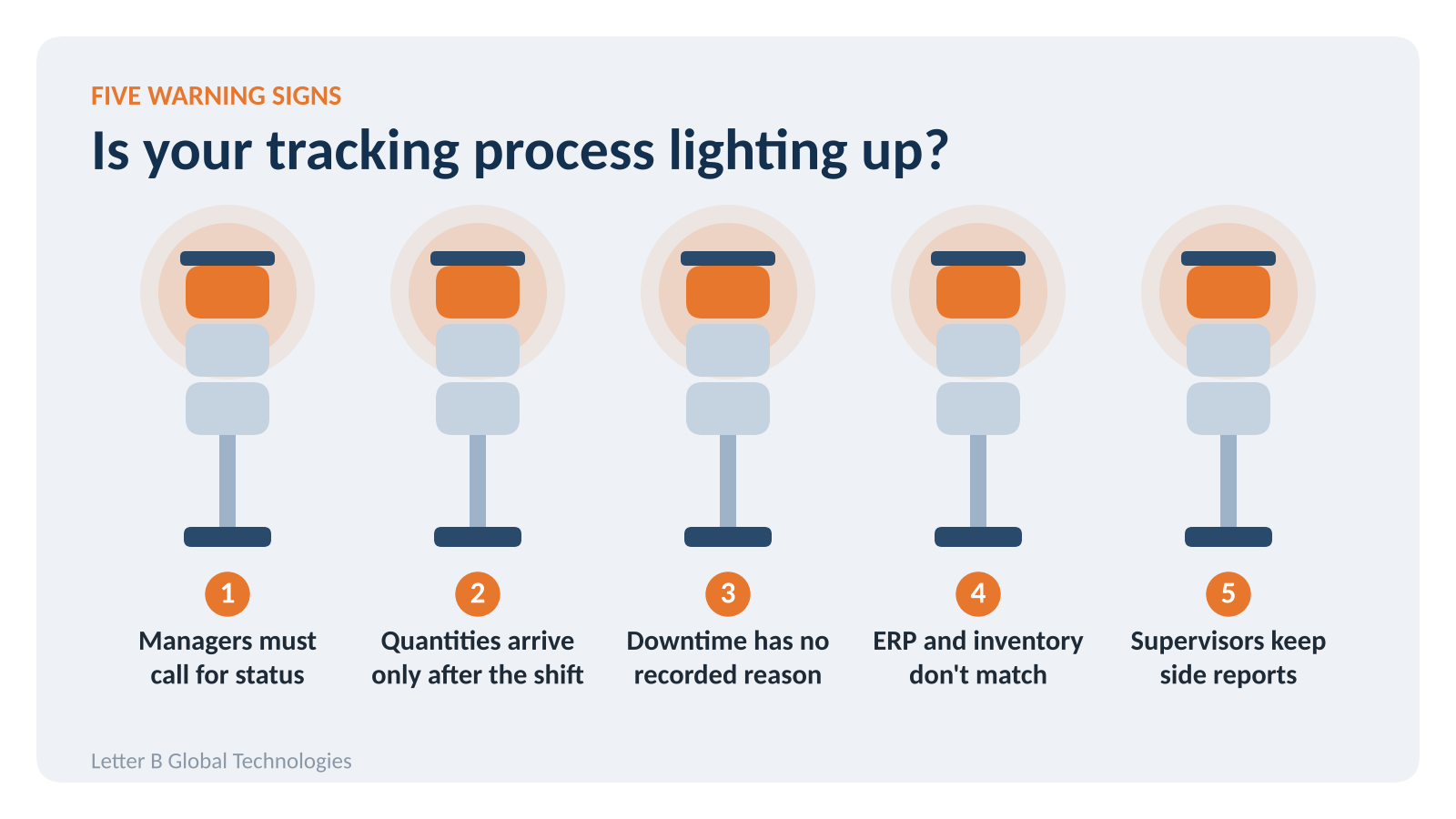
Each lit stack light is one warning sign.
1. Do managers have to call supervisors to check work-order status?
If the only reliable way to confirm progress is to contact someone on the shop floor, important information may not be in the business system. A shared tracking process lets managers see when work starts, moves between operations, hits delays or finishes.
2. Are production quantities updated only after a shift?
End-of-shift reporting may be fine for some operations. But when scheduling and delivery decisions depend on fresher updates, delayed quantities become a problem. Decide how often each event needs recording by asking what you would do differently if you knew an hour sooner. If the answer is nothing, a shift-level update may be enough.
3. Is downtime recorded without a clear reason?
Knowing that equipment stopped for 30 minutes is useful. Knowing whether it was missing material, a tooling issue, an equipment failure or a planned changeover is more actionable. Consistent downtime categories help you investigate recurring interruptions and see where improvement effort belongs.
4. Do production and inventory records not match?
A completed work order may not show in ERP or inventory until hours later, which creates uncertainty for purchasing, scheduling and customer service. The cause may be delayed data entry, unclear transaction rules or missing integration between applications.
5. Do supervisors keep separate reports to explain ERP data?
If employees repeatedly build spreadsheets to understand progress, the official reports aren't giving them what they need. The fix might be a revised report, a simpler operator screen, an integration or dedicated tracking software.
The strongest warning sign isn't the use of spreadsheets or manual reporting. It's the effort required to get dependable production information.
What should production tracking software monitor?
It should capture the information that helps managers make operational decisions. Not every manufacturer needs every feature, because requirements depend on production volume, methods, product complexity and existing systems. These are useful starting points.
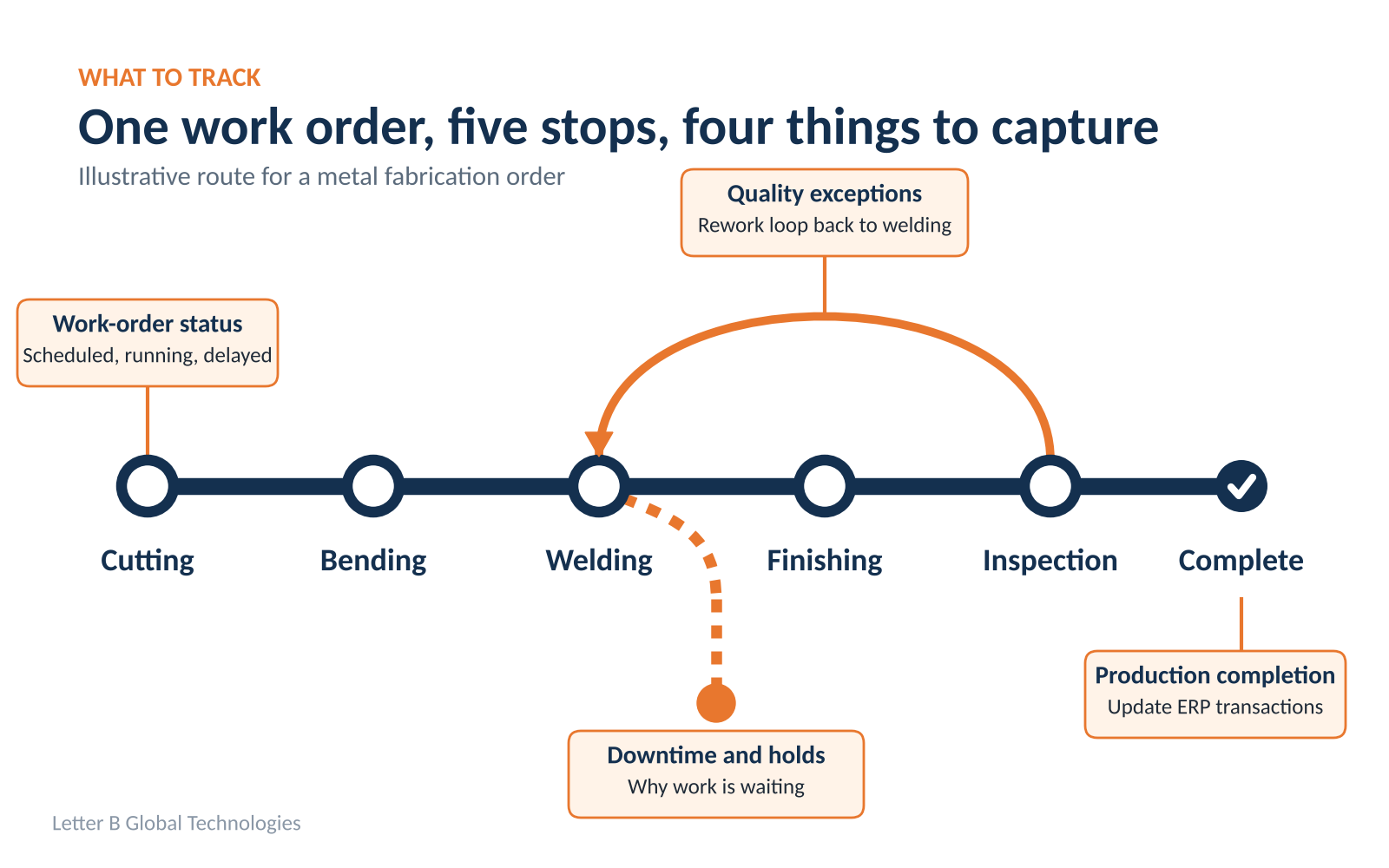
Four things to capture along one work order's route. Illustrative example.
| Tracking area | Information collected | Question answered |
|---|---|---|
| Work-order status | Scheduled, in progress, delayed, completed | Where is each order? |
| Production quantities | Planned, completed, rejected, reworked | Are we meeting the plan? |
| Downtime | Start time, duration, reason | Why did production stop? |
| Operation progress | Current stage and completion updates | Where is work waiting? |
| Quality exceptions | Inspection holds, rejected units, rework | What needs attention before work continues? |
| Production completion | Completed jobs and related transactions | What should be updated in ERP? |
What does a practical production tracking dashboard look like?
Consider a manufacturer with four active work orders.
| Work order | Planned | Completed | Status | Current issue |
|---|---|---|---|---|
| WO-1042 | 500 | 350 | In progress | None |
| WO-1043 | 200 | 80 | Delayed | Material shortage |
| WO-1044 | 150 | 150 | Completed | None |
| WO-1045 | 300 | 120 | In progress | Inspection pending |
Illustrative example; not actual customer data.
This view gives the production manager a starting point. Instead of asking which orders are delayed, the manager can ask why WO-1043 is waiting for material and whether WO-1045 needs action from the quality team. The dashboard doesn't solve those problems. Its value depends on whether the underlying information is accurate, current enough and connected to the right workflows.
How do production tracking software, ERP and MES differ?
All three can support manufacturing, and their capabilities overlap, but they usually address different needs. ERP manages broader business operations such as orders, purchasing, inventory and finance. An MES, as TechTarget defines it, connects, monitors and controls manufacturing systems and data flows on the factory floor. Production tracking focuses on recording and reporting progress and related events.
| System | Primary role | Typical information |
|---|---|---|
| ERP (enterprise resource planning) | Business planning, orders, purchasing, inventory and financial processes | Production orders, materials, inventory, order status |
| MES (manufacturing execution system) | Manufacturing execution, coordination and monitoring | Operations, production events, quality, traceability, work in progress |
| Production tracking software | Production status and progress reporting | Work-order updates, completed quantities, downtime, exceptions |
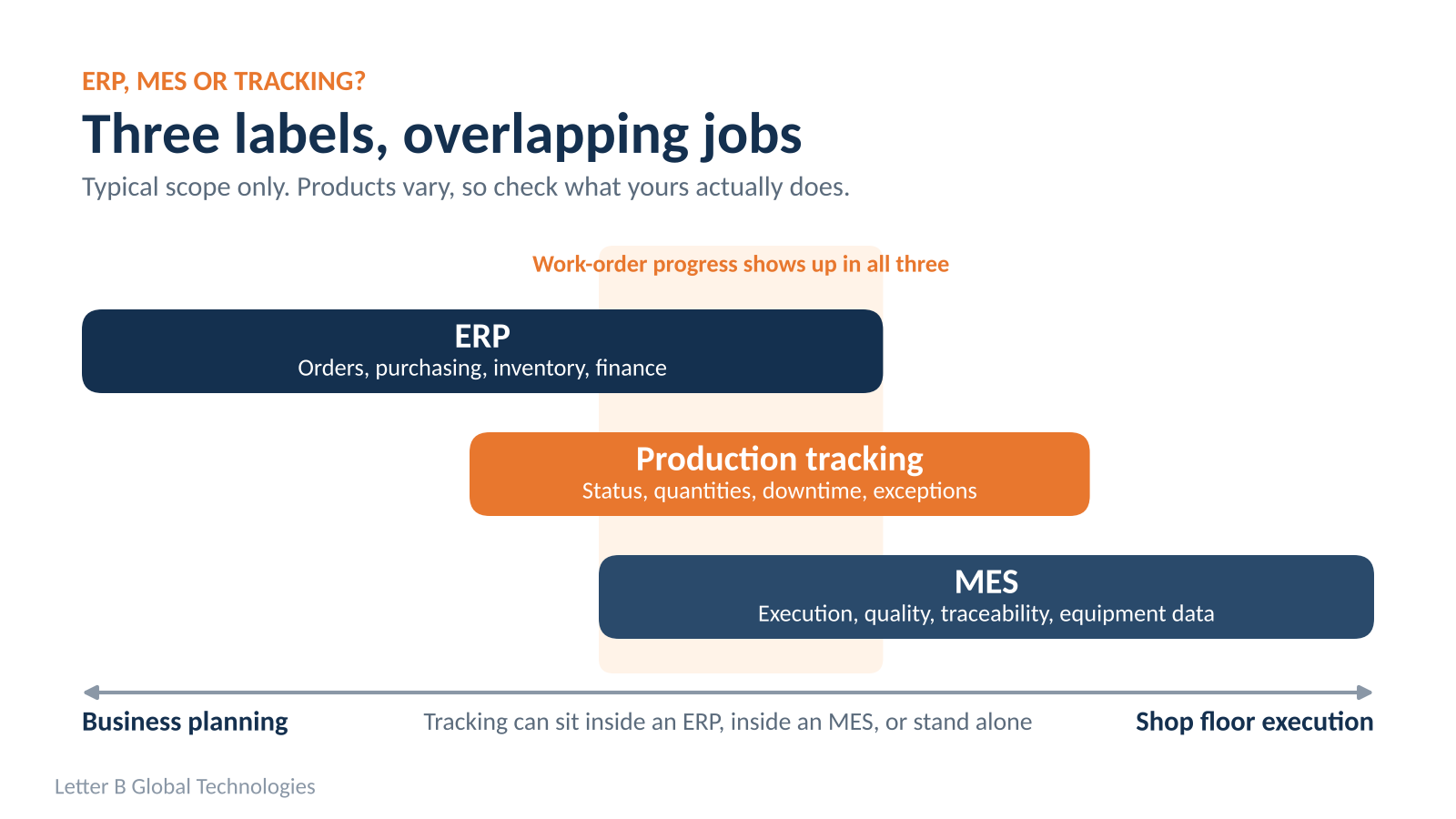
Typical scope only. Products vary.
Does production tracking software replace ERP?
Usually it complements ERP. The ERP may create and manage a production order while a tracking application records progress as employees complete operations. Approved updates then move back to the ERP according to the integration design. Some ERP products already include shop floor data collection, as Acumatica describes for its own product, so a separate application may not be necessary.
Is production tracking software the same as MES?
Not exactly. Production tracking is a capability that may exist inside an MES, an ERP or a standalone application. An MES can offer broader functions, depending on the product, such as production coordination, quality management, traceability and equipment data collection. Evaluate the capabilities you actually need before buying a larger platform. Decide from operational requirements, not software labels.
Should production tracking be manual or automated?
You don't need to automate every update to improve visibility. Manual entry, barcode or RFID scanning and machine-connected collection can each be the right choice.
| Tracking method | How it works | When it may fit |
|---|---|---|
| Manual operator entry | Employees record quantities, status or reasons for delays | Low-volume production, exceptions, inspections |
| Barcode or RFID scanning | Employees or equipment record identification and movement events | Work-order transitions, material tracking |
| Machine-connected collection | Software collects supported equipment or process signals | Machine status, cycle events, selected measurements |
| Hybrid | Combines automated collection with employee input | Operations that need both machine data and human explanations |
A machine connection may show that equipment is stopped, but the system may still need an operator to say whether it was a planned changeover, a failure or missing material. That's why automated production monitoring and production tracking are related but not identical. Monitoring equipment produces data. Tracking also needs work orders, operations, quantities and business context. Before automating, confirm which events need recording, how accurately they can be captured and who handles exceptions.
Can manufacturers improve production tracking without replacing ERP?
Yes. Manufacturers can often improve production tracking by configuring existing ERP features, integrating current systems or adding a focused application for shop floor data collection. Replacing ERP shouldn't be the default response to limited visibility. Four approaches are worth evaluating.
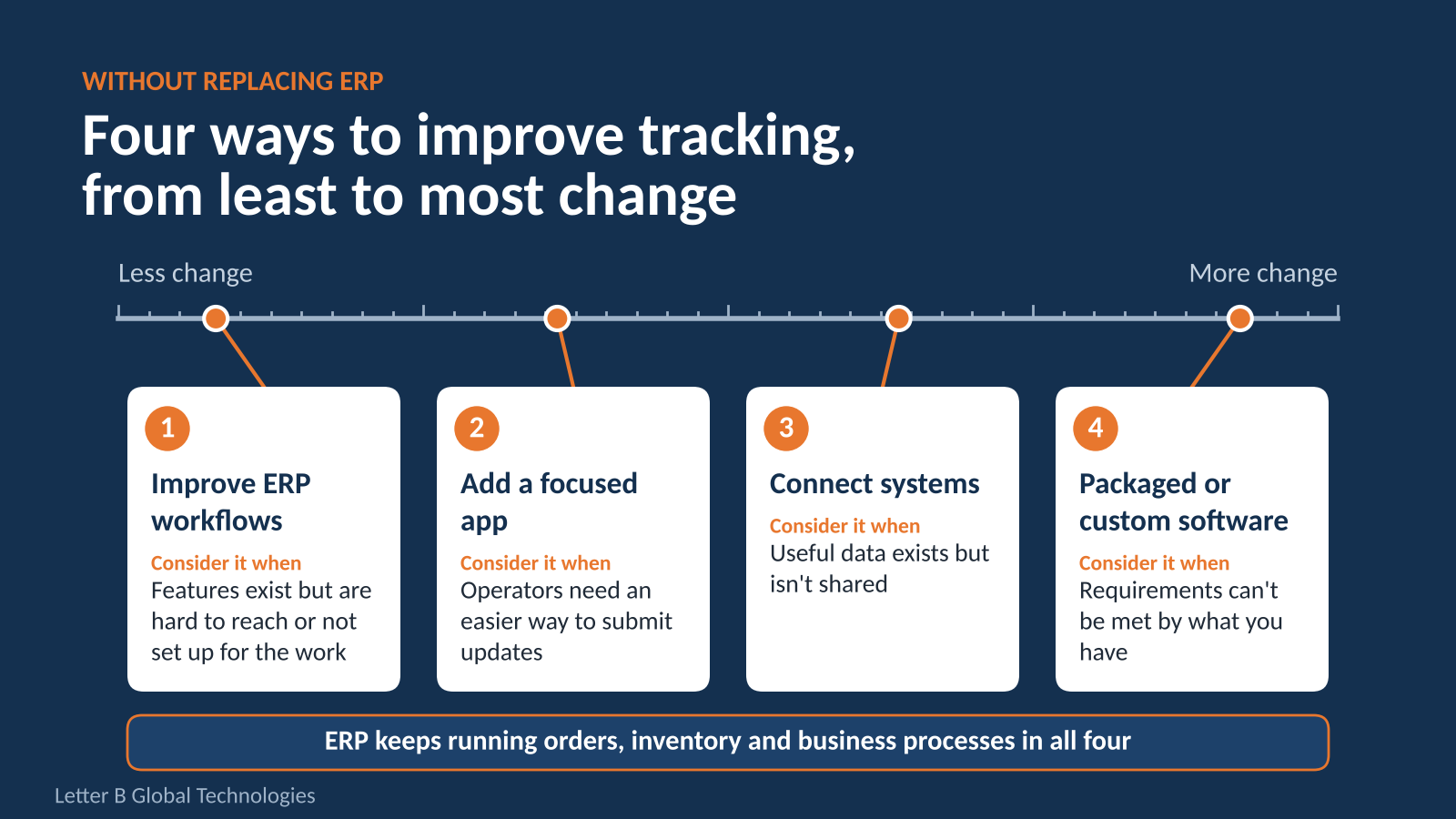
Four options, ordered by how much they change.
1. Improve existing ERP workflows
Start by reviewing what your ERP supports. It may already let operators record production completion, quantities and work-order transactions. The problem may be that these features are hard to reach, used inconsistently or not set up for the current workflow. Improving existing functionality may be less disruptive than introducing another platform.
2. Add a focused production tracking application
A manufacturer may only need an easier way for employees to submit work-order updates or record downtime. A focused application can collect that information while ERP keeps managing production orders, inventory and other business processes. The integration should define which system owns each record and how updates are validated.
3. Connect existing production and business systems
Equipment monitoring, quality, inventory or production applications may already collect useful information but not share it. Targeted integration can reduce repeated entry and make operational reports more consistent. If connectivity problems run wider than production, see Letter B's guide to why manufacturing systems don't work together for related dependencies.
4. Evaluate packaged or custom software
Dedicated tracking or shop floor management software may be appropriate when existing applications can't meet operational requirements. Packaged solutions offer established features and vendor support. Custom software may make sense when the business has specialized production stages, unusual reporting needs or older applications that need tailored interfaces, which is the situation our guide to modernizing legacy software without disrupting production covers. Custom development also needs a plan for testing, cybersecurity, maintenance and future support.
Neither approach is automatically better. The right decision depends on functional requirements, total cost, implementation risk and how the software will fit into existing operations.
How do you choose production tracking software for your operation?
Before comparing products, review one real production workflow. Follow a work order from release through production, inspection and completion, and document where information becomes unavailable or unreliable. The trace described earlier gives you a head start. Then work through this checklist.
- Production requirements: Which work-order stages, quantities, delays and exceptions must be captured?
- Data collection: Will information come from employees, scanners, machines or existing applications?
- Reporting frequency: Which updates must be available immediately, and which can be recorded periodically?
- ERP integration: What needs to move between the tracking application and ERP?
- Employee usability: Can shop floor employees record updates without interrupting essential work?
- Data accuracy: How does the system handle duplicate transactions, missing records and corrections?
- Reliability and security: What happens if the network or application is unavailable, and who can access or change production information?
- Implementation cost: What will integration, training, maintenance and support require?
- Business outcomes: How will you decide whether tracking has improved?
How do you start with a limited pilot?
You don't need to change every production line at once. Pick one work center where supervisors often struggle to confirm work-order progress, document the current process, introduce a practical way to record updates and compare the results with existing records. Test normal production, delays, corrections and what happens when the system is unavailable. Then check whether managers get more reliable information and whether employees can keep up the process without extra administrative work. If it works, consider expanding to other work centers or stages.
How do you measure whether production tracking has improved?
Better tracking should produce more dependable information and support better operational decisions. Useful measures include:
- Update timeliness: How quickly are production events recorded and made available?
- Status accuracy: Do reported work-order statuses match what is happening on the floor?
- Reporting effort: How much time do supervisors spend preparing or reconciling reports?
- Downtime data completeness: Are interruption reasons recorded consistently?
- Exception visibility: Can managers identify delayed work orders and investigate the causes?
These measures show whether a change is working. Better visibility doesn't automatically mean higher output or lower costs, because those results depend on what people do with the information. The first goal is production records that are reliable enough for the people running the operation.
What is a practical next step for your shop floor?
Production managers need dependable information about work-order progress, completed quantities, delays and exceptions. Getting it doesn't always require replacing ERP or adopting a new manufacturing platform. For some manufacturers, the answer is better use of existing software. Others will gain more from targeted integration, improved data collection or a custom application built around their production workflow.
Letter B Global Technologies helps manufacturers address specialized software challenges through custom application development, systems integration and legacy modernization. If your production team relies on manual updates, spreadsheets or disconnected reports to see what's happening on the floor, reviewing the current workflow is a practical place to start. You can also read our overview of smart manufacturing or see Letter B's manufacturing software work.
Enjoyed this insight?
Explore how Letter B turns the same challenge into an operational win.
Common questions about manufacturing
Production tracking focuses on work-order progress, quantities, manufacturing stages and related events. Production monitoring often focuses on equipment status, downtime and process performance. Some platforms support both.
Related insights
View all
Manufacturing Quoting Software: When Should You Move Beyond Spreadsheets?
Is it time to move beyond spreadsheets? See five warning signs, how estimating, CPQ, ERP and custom quoting differ, and what to test first....
Read article
Digital Transformation in Manufacturing: How to Prioritize Technology Investments for 2027
Digital transformation in manufacturing needs a plan. Learn how to score technology projects, decide what comes first and build a 1–5 year r...
Read article
How Manufacturers Can Modernize Legacy Software Without Disrupting Production
How manufacturers can modernize legacy software without stopping production: five warning signs, a six-step process and a 2027 budget roadma...
Read article